Build estimates your whole teamcan understand and trust.
Buildiante turns quantities into a structured BOQ with consistent pricing, markups, approvals, and a clear path into scheduling and tendering.
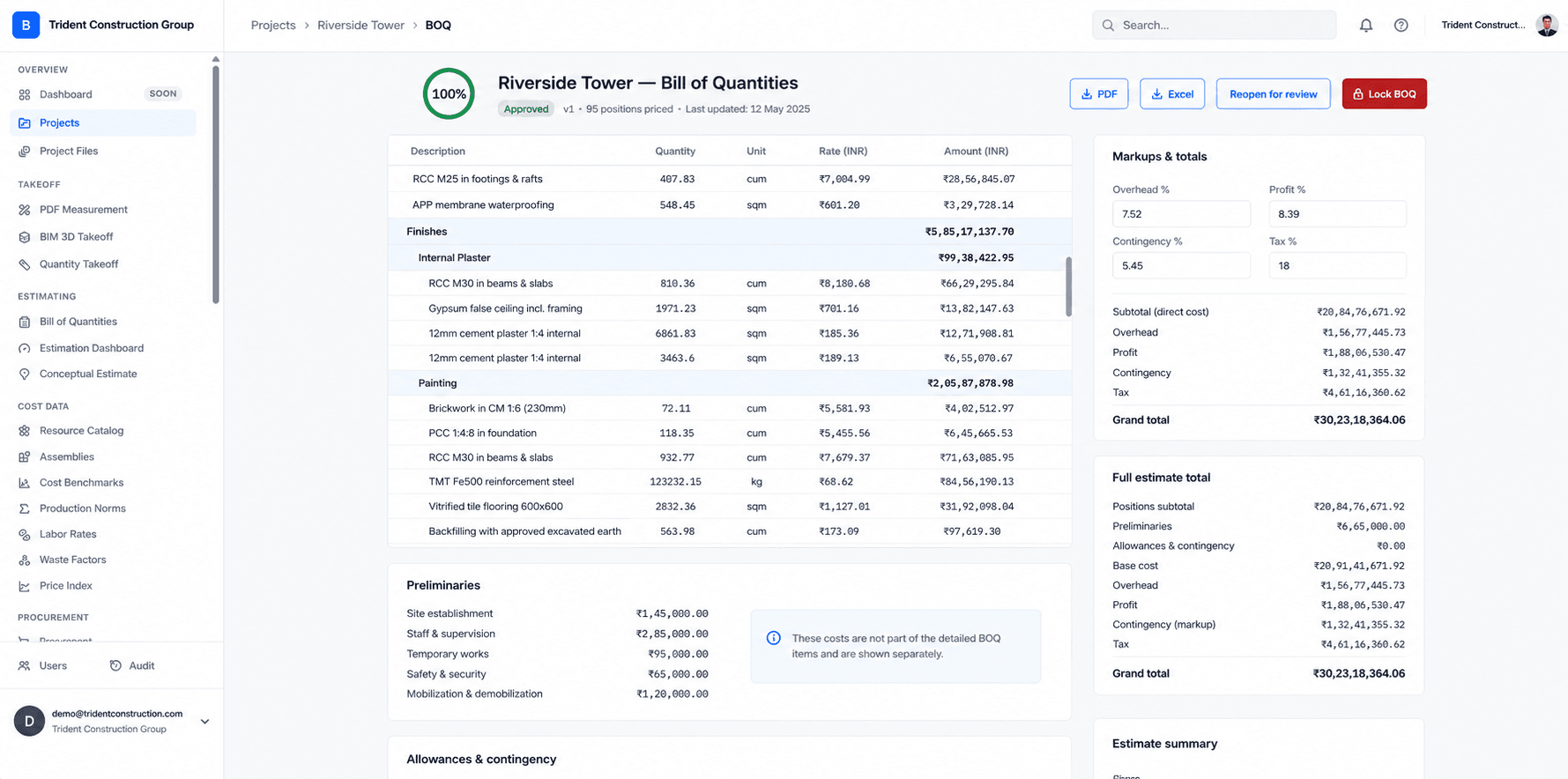
Structured BOQs
Keep sections, items, quantities, units, and rates organized in one estimate.
Consistent calculations
Apply pricing and markups through a consistent estimating workflow.
Ready for the next step
Carry the estimate forward into scheduling and subcontractor tendering.
When the estimate lives in a spreadsheet, the logic often lives in one person's head.
Complex formulas, copied cells, hidden assumptions and manual revisions make it difficult for everyone else to understand exactly how the final number was produced.
Make the estimate a shared, structured project record.
Buildiante gives your team a common structure for pricing the work, applying markups, reviewing revisions, and moving the estimate into the next stage of the project.
From quantity to approved project value.
Buildiante keeps the estimating process structured so the number your team produces can continue through the rest of the project workflow.
Structure the BOQ
Organize the estimate into sections, items, quantities, units, and rates that your team can work with consistently.
Price the work
Apply quantities and unit rates to build a complete project cost instead of relying on disconnected spreadsheet formulas.
Apply markups
Handle overhead, profit, contingency, and tax as part of the estimate rather than hidden spreadsheet calculations.
Review & approve
Keep the estimate structured and traceable as it moves through review and approval.
Everything you need to build the estimate.
Where Buildiante does some of the reading for you
Every one of these is reviewed by a person before it changes anything — that is a hard rule in the system, not a setting.
Start the BOQ from a PDF instead of a blank sheet
A client BOQ, a tender schedule, a priced-schedule PDF — if it has a table, Buildiante reads it into draft positions (description, quantity, unit) for you to review and insert. Read from the document, not generated. You confirm every row.
- Deterministic table read; an AI-assisted structuring pass only for PDFs with no real table.
- Draft positions, reviewed line by line — the same review-then-confirm step as every other way work enters a BOQ.
- Rates arrive blank; you price them.
A quiet flag when a rate looks off against your own history
Buildiante compares a position’s unit rate against the same item priced on your other BOQs and flags the ones that sit well outside that range. It’s a rule-based check on your own numbers — not a prediction, and not a trained model. It says how much history it drew on, and on a new account with little history it simply says so.
- Compares against your tenant’s own priced positions for the same item and unit.
- Flags an outlier only when both a spread test and a fence test agree — deliberately conservative.
- Every result is labelled "rule-based check (not a model)" and shows the sample size.
A rate suggestion drawn from what you’ve priced before
When you add a position, "From history" shows the median (and the range) of what you’ve charged for the same item across past BOQs. It’s an average of your own data — arithmetic, not a model — and it gets more useful as you price more work. Below a handful of matches it says there isn’t enough yet.
- Median plus low–high range of matching priced positions in your account.
- One click to use it; you can always type your own instead.
- Improves with usage; honest when the history is too thin to suggest anything.
A won deal gives the next BOQ a head start
When a project is created from a won CRM deal, an empty BOQ offers the section structure of a comparable past project — matched on client, deal size, and scope wording. It’s a similarity match on your own past jobs, not AI, and it only appears when there’s a genuinely comparable project to copy from.
- Copies the section/position structure of a comparable past project — quantities start at zero, you fill them.
- Assembly-priced lines carry their rate through; the rest start blank.
- Shown only when the match is real; absent (not empty) on a fresh account with no comparable deals.
Built for teams responsible for the number.
Estimators and quantity surveyors at small-to-mid contractors who currently build the Bill of Quantities in a spreadsheet — one tab per section, formulas linking rates to totals, and a markup calculation redone by hand on every revision.
Move away from spreadsheet-driven estimating.
A BOQ spreadsheet with linked-formula rate calculations, a separate markup worksheet, and a manual re-typing step whenever the estimate needs to become a schedule or a tender package.
Estimate feeds directly into the next step of the loop:
Project SchedulingBuild the number.Know where it came from.
Create your next project estimate in a structured workflow your whole team can work from.