Know what was ordered,received, and invoiced.
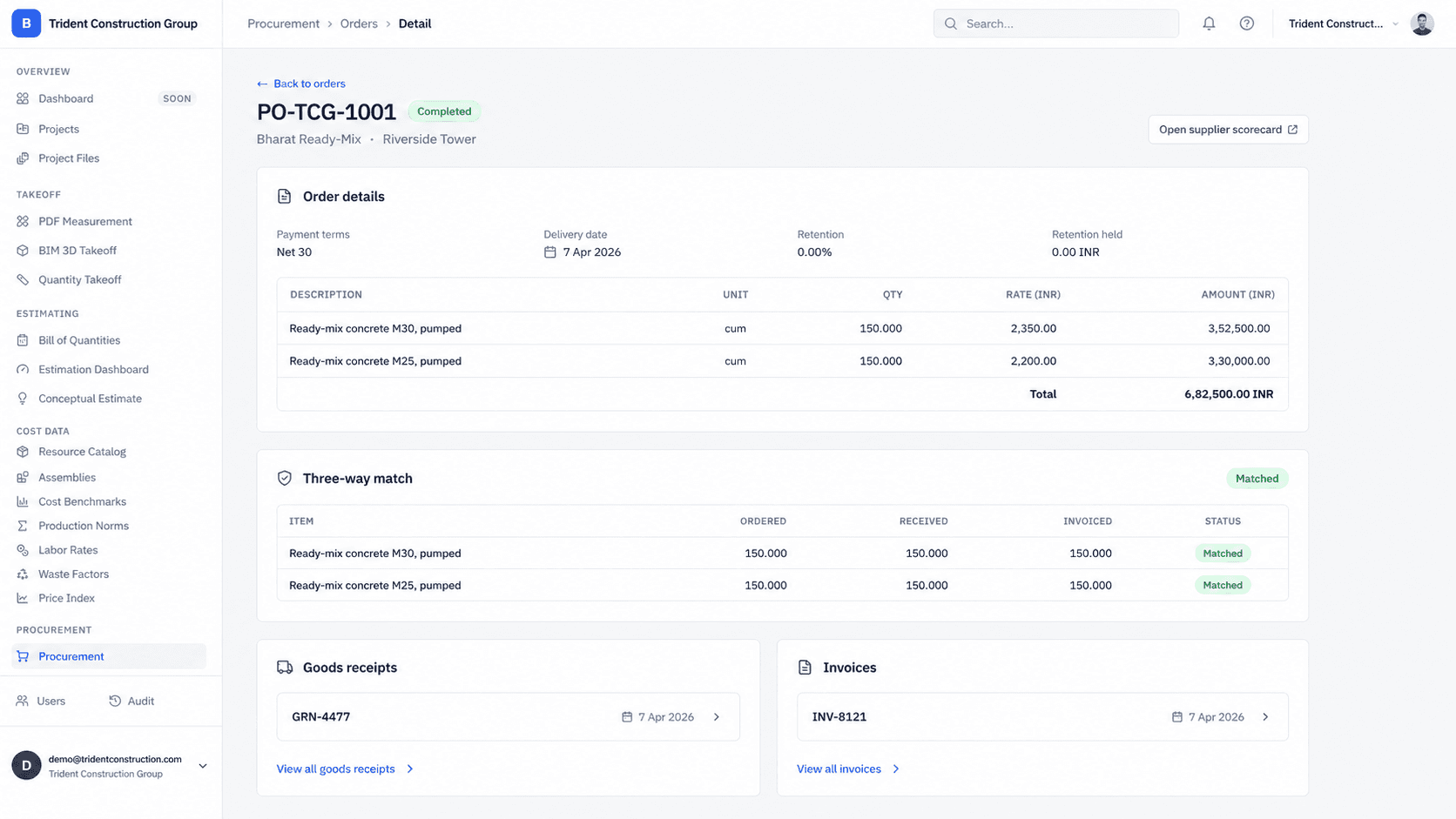
Buildiante connects purchase orders, goods receipts, and supplier invoices so your team can verify what was actually delivered before approving the payment.
Complete PO lifecycle
Create and manage purchase orders while keeping the supplier and project context together.
Track what arrived
Record goods received against the quantities that were actually ordered.
Match before approval
Compare order, receipt, and invoice information before moving forward with approval.
An invoice should not be approved in isolation.
When purchase orders, delivery records, and supplier invoices live in separate places, your team has to manually determine whether the billed quantities actually match what was ordered and received.
Put the three records beside each other.
Buildiante keeps the purchase order, goods receipt, and supplier invoice connected so your team can see whether the quantities align before approving the transaction.
One purchase. Three records. One clear answer.
Procurement becomes easier to verify when the order, delivery, and invoice are connected to the same transaction.
Purchase order
500units
Goods receipt
500units
Supplier invoice
500units
Three-way match complete
Ordered, received, and invoiced quantities are aligned.
From awarded bid to verified purchase.
Procurement starts with the work your team already awarded and follows it through delivery and invoice verification.
Create the PO
Turn the awarded scope into a purchase order with the quantities, rates, supplier, and delivery details your team needs.
Receive the goods
Record what actually arrived on site and keep the goods receipt connected to the original purchase order.
Record the invoice
Keep the supplier invoice connected to the same procurement record instead of reconciling documents manually.
Match before approval
Compare ordered, received, and invoiced quantities before the transaction moves forward for approval.
Everything you need to control procurement.
Where Buildiante does some of the reading for you
Every one of these is reviewed by a person before it changes anything — that is a hard rule in the system, not a setting.
Read a vendor invoice instead of retyping it
Upload a vendor’s invoice PDF and Buildiante pulls out the header (number, date) and the line rows (description, quantity, unit price, amount), then lines each row up against the purchase order for you to check. The match is a suggestion you confirm — Buildiante writes nothing until you record the invoice the normal way.
- Deterministic read of a tabular invoice PDF; tax and subtotal rows skipped; a missing amount is computed from the other two, never guessed.
- Each extracted line gets a suggested PO line with a confidence figure — below a floor it stays unmatched for you to decide.
- Recording the invoice is the same manual step as always; extraction just fills the form.
The three-way match, prioritised for you
Every order already checks ordered vs. received vs. invoiced line by line. On top of that, Buildiante ranks the lines that don’t match by how much money is at risk and gives each a plain likely cause — so the biggest discrepancy is the first thing you see, not the smallest. Rules on the order in front of you; works from your first PO.
- Non-matching lines ranked by value at risk (gap quantity × rate).
- A deterministic likely cause per mismatch — over-delivery, short invoice, price change.
- No history needed — it works on order number one.
A read on vendor delivery reliability
From the delivery dates you’ve already recorded, Buildiante flags a vendor whose on-time rate is trending down, sitting low overall, or who has issued orders past their promised date with nothing received. Rule-based flags on your own receipt history — not a score from a model — and it needs a few recorded deliveries before it says anything.
- Earlier-half vs. recent-half on-time trend, low overall rate, and open past-due deliveries.
- Reads your recorded goods-receipt dates; nothing inferred.
- Quiet until there’s enough delivery history to be worth showing.
Built for teams managing project purchasing.
PMs and site buyers who currently track purchase orders in a spreadsheet or a vendor's own paperwork, and find out an invoice doesn't match what was actually delivered only after the fact.
Move away from disconnected purchasing records.
A PO log spreadsheet, a paper goods-receipt note, and a manual line-by-line check against the invoice when it finally arrives — usually after the mismatch has already caused a problem.
Procure feeds directly into the next step of the loop:
Field OpsOrder it. Receive it.Verify it.
Keep purchase orders, deliveries, and invoices connected so your team knows what was actually received before approving payment.